
Professional-grade file archiving utility
Bandizip is a free file compression program for PC developed by Bandisoft. It is an archive management tool geared towards professional users who need quick and easy compression and decompression of their files and data. It utilizes multi-core processing to achieve speedy results and boasts AES-256 encryption for added security.
Top Recommended Alternative

Comparable to other popular options like 7-Zip or WinRAR, Bandizip has wide file format support and seamless integration with contextual menus. A one-time purchase license option is also available to users who want more advanced features and options for more demanding needs and requirements they may have.
Stylish, but Powerful
Right off the bat, the first impression you’re going to get with this program is the fact that it is extremely stylish in design. Impressively, its installer is just as stylish as the program itself. The Bandizip has a blue and white color scheme that’s very similar to Facebook’s Messenger, and its installer has that color scheme as well. The installation process itself was pretty quick and easy. It just took a few seconds and the program was installed.
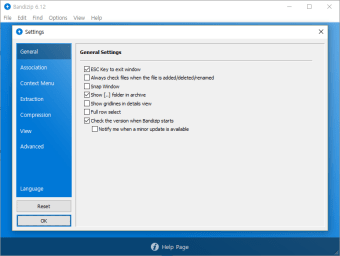
One minor problem with the installation process was that after the program has been installed, users will be directed to the Settings at once. For people who use archives and file compressors often, they may not get lost. In fact, they may even appreciate this feature. However, for most people, this will no doubt be a source of confusion. Thankfully, there’s no need for new users to actually change any settings. If you’re not comfortable changing any settings in fear of causing damage and problems, you can just click OK and you’ll still be able to use the program just fine.
Compression and Extraction
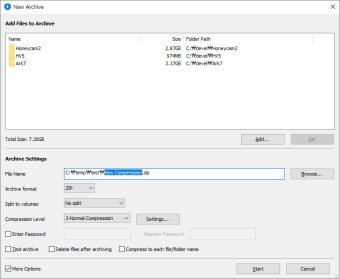
I’ve never had a problem creating archive files with the industry mainstays such as 7zip and Winrar, so Bandizip had high expectations on its shoulders. Fortunately, it did deliver a solid performance. Compression is an extremely intuitive and simple process. The first screen of the program only has two buttons, Open Archive and New Archive. Obviously, if you want to make a new archive, just click on the corresponding button. In the new dialogue box that will pop-up, add the files that you need then click start. There are several settings at the bottom half of the dialogue box that you can edit according to your wishes, but if it’s just simple compression, there’s no need to touch those.
Extraction just as simple. From the same start screen, all users have to do is click on Open Archive and choose the archive that they need. They will be able to view the files within the archive and from the commands at the top of the screen, they can choose to extract, add files, delete, and more. Alternatively, users can proceed to the archive using their file explorer and right-click in the file. Bandizip has a cool feature where the files of the archive are previewed in the right-click menu.
You can also test archive integrity for issues or errors during the compression or decompression process. Other notable features include smart file extraction and the ability to edit files inside archives. There are some things it could still add in the future, though. Some of them are corrupted data repair and improving decompression speeds to match its impressive compression prowess.
An impressive archiver
All in all, Bandizip is a solid alternative to popular archiving tools that can even best them in compression speeds. It's pretty intuitive to use, offers wide file support, and comes with plenty of handy extras to enhance the user experience. It's not the most feature-packed of them all, but it will more than suffice for most users' needs. Give it a try and see for yourself.













.png)